Are NetSuite Email Approvals Secure? What Happens When Someone Forwards the Email
A finance manager forwards an approval email to their assistant with a quick note: “Can you take care of this?” The assistant clicks Approve. The purchase order clears. In NetSuite, the audit log records the finance manager as the approver, because the button was tied to their assignment, not to whoever happened to be holding the email.
Nothing broke. That is the problem.
I get some version of this question almost every time email approvals come up in a demo. What stops someone from forwarding the email? If the Approve and Reject buttons live in an inbox, and inboxes get forwarded, delegated, and left open on unlocked laptops, then who is really approving?
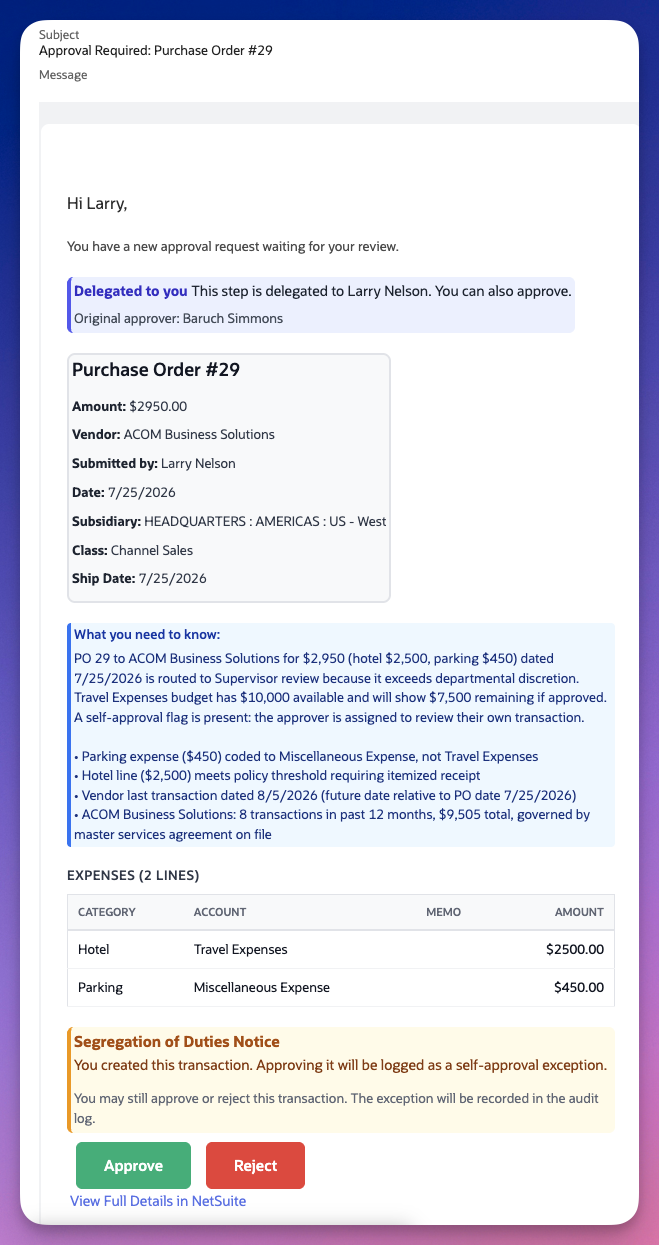
Those Approve and Reject buttons at the bottom are the whole convenience of email approvals, and also the whole worry. They work for whoever is holding the message.
The Honest Answer Used to Be “Don’t Forward It”
For a long time the answer was exactly that. The buttons work for anyone who has them. Whoever clicks Approve triggers the action, and it gets logged under the person the step was assigned to. So the guidance was simple: treat the email like a signature. Don’t forward it, don’t share it, don’t leave it sitting open.
That guidance holds only as long as everyone follows it, and people don’t. They forward things, assistants manage inboxes, and a phone left on a desk is one anyone can pick up. For a control that has to survive an audit, asking people to be careful isn’t much of a control.
Some teams looked at that and decided email approvals were too loose for anything material. They kept the convenience for low-dollar items and pushed everything else back into the NetSuite UI, which meant more logins, more licenses, and slower approvals for exactly the transactions where speed mattered.
The Fix: A Code Only the Assigned Approver Receives
There is now an optional setting that closes the gap. When it is turned on, clicking Approve or Reject no longer completes the action on its own. It takes the approver to a verification step first.
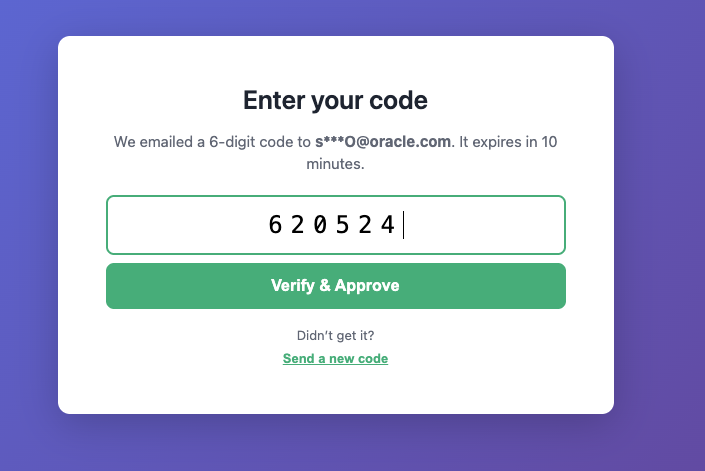
The system generates a 6-digit code and emails it separately to the assigned approver’s own address. The approver enters that code to finish the action. The code expires in ten minutes, and if it gets lost or times out, there is a link to send a new one.
Here is why that matters for the forwarding problem. The buttons can travel. The code cannot, unless the person also controls the approver’s mailbox. Forward the approval email to an assistant and they will hit a screen asking for a code that landed in someone else’s inbox. The action stops there.
In practice it works as a second factor on the approval itself, tied to the address the assignment actually routed to.
What It Does and Doesn’t Change
The setting is optional, so you decide where it applies. Plenty of organizations are fine with a single quick click for routine items and want the extra step only on higher-risk transactions. Others turn it on everywhere. Where you draw that line is a policy decision, and the setting supports either approach.
When the code step is on, a few things are true:
- The code goes to the assigned approver’s email address, not to whoever is holding the forwarded message.
- Both Approve and Reject run through verification, so a forwarded rejection can’t quietly kill a transaction either.
- The code is short-lived and single-purpose, so an old email dug out of an archive is not a working key.
- The audit trail still records the same details it always did: who approved, when, which rule routed the step, and what the transaction looked like at the time.
What it doesn’t do is turn email approvals into a login. There is still no NetSuite license required, and the approver still sees the full transaction context in the email itself, the header fields, line items, delegation notes, and any segregation of duties warnings. The code adds a check at the moment of action. It doesn’t take anything away.
If you want the background on how the approval email carries that full context in the first place, and why that removes the need for a per-approver license, that is covered in the email approvals post.
Why This Belongs in the Approval Layer
You could argue that mailbox security is IT’s job, and it is. But approval controls that depend on every approver having perfect email hygiene are approval controls with a soft center. Auditors ask how you know the person named on the approval is the person who made the decision. “We told everyone not to forward the email” is a weak answer. “The action required a code delivered only to the assigned approver, and it is logged” is a much better one.
Email approvals were always the convenient option, and the question of who is actually clicking was always a fair one to raise. Turning on the code lets you keep the convenience without brushing that question aside.
Keep email approvals convenient without leaving the door open. Greenlight’s optional verification code sends a 6-digit code to the assigned approver’s inbox, so a forwarded email can’t complete an approval on someone else’s behalf, and every action still lands in one auditable record. See how it works in a 30-minute walkthrough →